
Managing your own logistics requirements in Loady
FAQs for Loady users
Initially, the object structure should be set up in Loady (sites, loading points, assignment of products to loading points, company products, business partners including sites, unloading points, assignment of products to unloading points). It is important to consider the dependencies between the individual object types (e.g., a loading point cannot be created before the site has been set up; a company product cannot be assigned to an unloading point at a business partner before the business partner, the business partner's site, and the unloading point exist).

Once the object structure has been set up, you can begin managing the requirements at the level of the respective objects.
If you have general questions about Loady, please contact support@loady.com. If your questions specifically relate to Previous Loading Restrictions or ePLR-Check, please contact plr-support@Loady.com
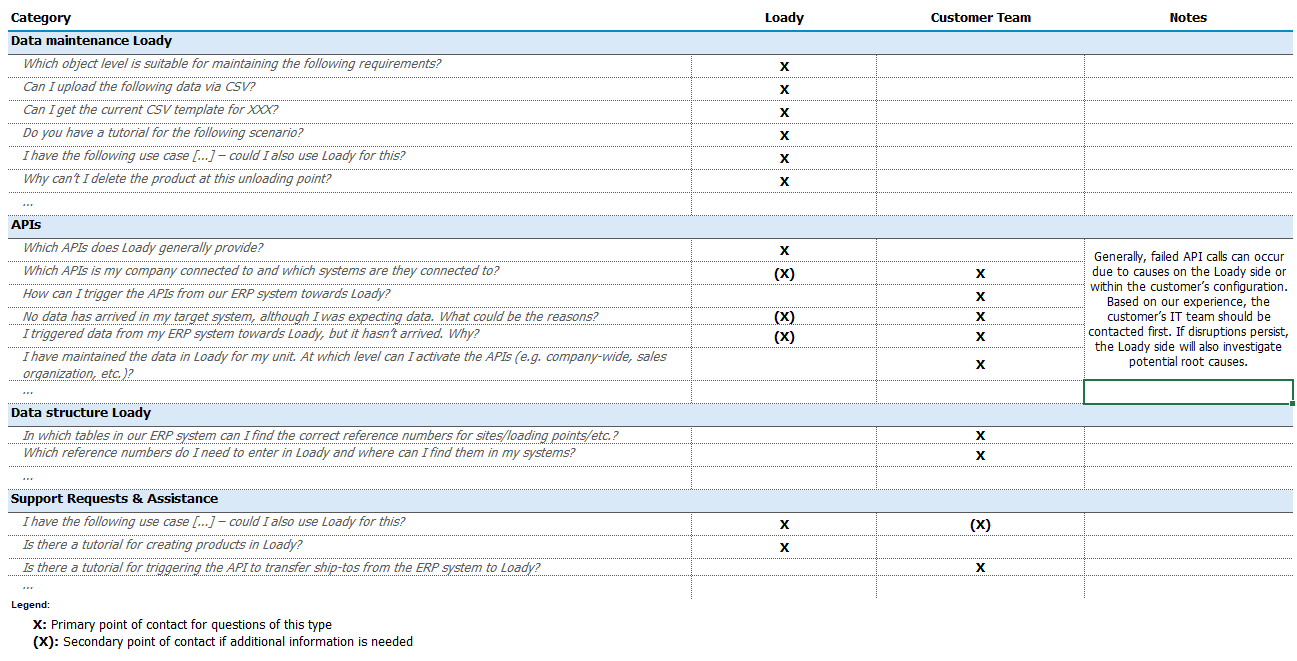
All questions that are related to Loady but concern processes or systems within the customer's company must be directed to the respective responsible parties within the company (e.g., IT department, application owner, administrators, support mailboxes).
The attached table shows which topic categories Loady or your own team can support.
A fundamental prerequisite for deleting objects in Loady is that the object is not contained in any connecting elements, such as in requirement profiles and lanes .
Examples:
- To delete an outbound product, all requirement profiles and lanes in which the outbound product is contained must first be deleted.
- At all loading/unloading points where the company product was assigned as an inbound or outbound product , it must be removed before it can be deleted.
To delete various objects in Loady, the following order must be observed:
- Requirement profiles
- Lanes
- Inbound and outbound products
- Company products
- Loading and unloading points (buildings)
- Sites
- Business partners
In cases where free text fields are not maintained in all input languages available on Loady, Loady defaults to the standard language English . This means that free text fields must always be maintained in at least English. Otherwise, data in free text fields cannot be saved. If Loady is used in another language, e.g., German, to maintain the content in English, the input language must be changed via the language selection for free text fields to English.

If the data is only maintained in English, the English entry will be displayed as a fallback when Loady is used in another language.
There is no universal solution for structuring data in Loady. The structure in Loady should mirror the data structure of the ERP system. The following provides some guidance to minimize potential conflicts.
Object names should be clear and unambiguous to ensure good clarity. For a functional exchange of data between the ERP system and Loady, the field ERP Reference Number, which must be maintained for each object, is crucial. The exact designation from the ERP system must be entered here.
For optimal clarity and assignment of different loading/unloading requirements, it is recommended that separate loading/unloading points be created for clearly distinguishable loading procedures.
The following are examples of how loading/unloading points can be divided according to different loading procedures:
- Bulk products vs. packed products
- Container vs. truck loading
For example, a site could be created in Loady that includes several loading/unloading points.
In this example, these are clearly separated by the type of goods being loaded or the processes required for loading:
- Site: 001
- Loading Point: 001_Bulk
- Loading Point: 001_Packed_ Truck Loading
- Loading Point: 001_Packed_ Container Loading
Should any ambiguities arise regarding the data structure, our Customer Success Team is happy to provide individual consultation.
Currently, only data related to created lanes can be downloaded. This includes data for actively used lanes under Lane Management or data for lanes assigned to a tender (Loady4Tender), can be downloaded.
For additional data exports, the Customer Success Team can be requested.
Loady currently does not support PDF uploads. You can upload the PDF to a website and insert a link as a URL in the corresponding free text field in Loady.
Requirement Profiles are designed so that the objects contained therein (Business Partner, Site, Unloading Point, Inbound Product) cannot be exchanged or replaced by others after creation. This is because a requirement profile establishes a unique combination of these objects.
Therefore, if a Business Partner, an Inbound Product or an Unloading Point needs to be adjusted within a requirement profile, a new requirement profile with the desired objects must be created. If the requirement profile with the original objects is no longer needed, it must be deleted.